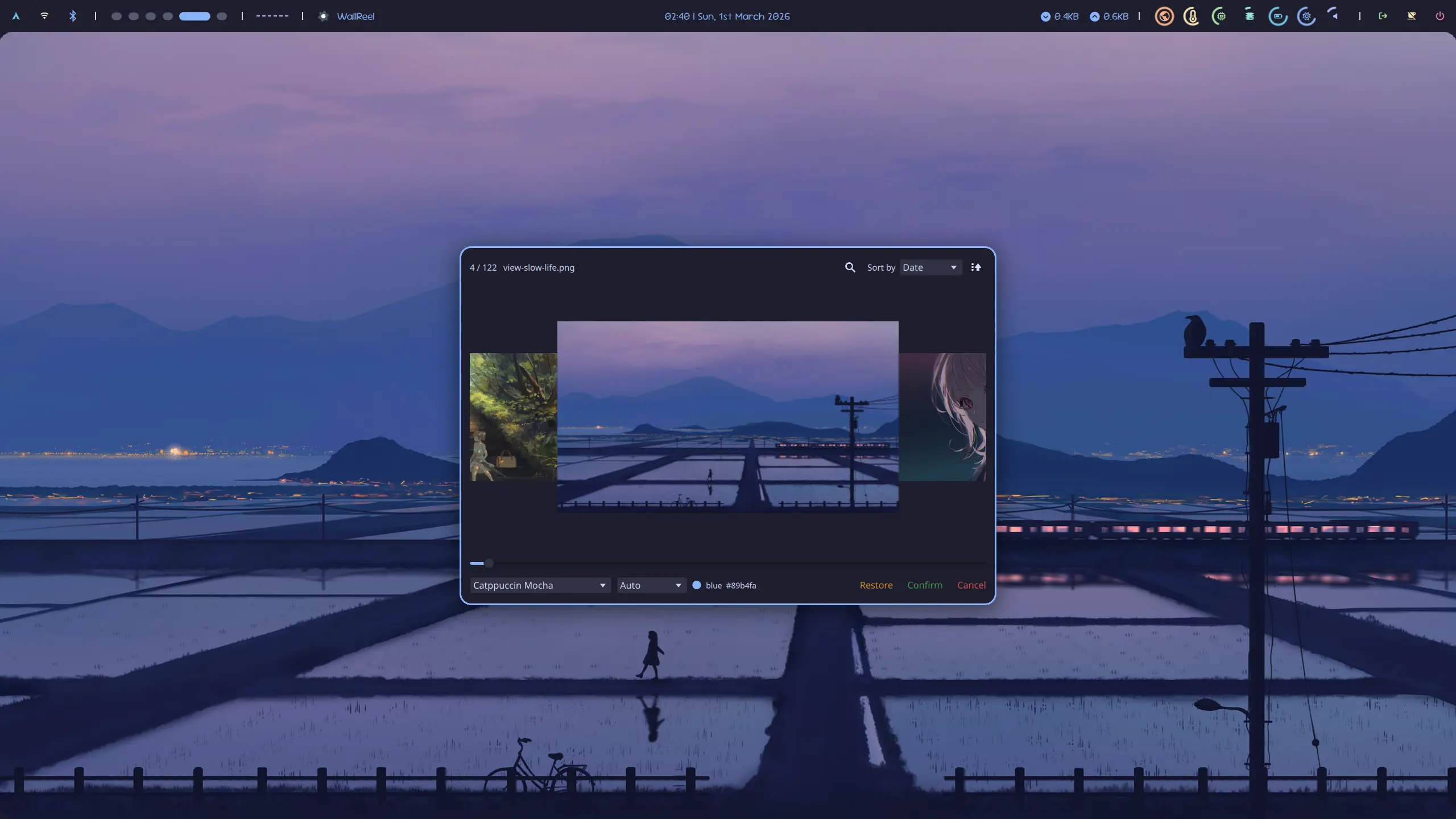
## What this is
It might not be that worthy to build a Qt application from ground for such a small feature, but I kind of enjoy the pain... So here it is.
 ## How to build
1. Make sure you have Qt6 libraries, CMake and a C++ compiler installed.
e.g. On Arch-based systems:
```bash
sudo pacman -S --needed qt6-base qt6-declarative cmake gcc
```
on Debian-based systems:
```bash
sudo apt install --no-install-recommends qt6-base-dev qt6-declarative-dev qml6-module-qtquick qml6-module-qtquick-controls2 qml6-module-qtquick-layouts qml6-module-qtquick-templates qml6-qtqml-workerscript cmake g++
```
2. Clone the repository:
```bash
git clone https://github.com/Uyanide/WallReel.git && \
cd WallReel
```
3. Build and install:
This is a standard CMake managed project, so the build process is pretty normal and straightforward. First, configure the project:
```bash
cmake -S . -B build -DCMAKE_INSTALL_PREFIX=/usr/local
```
Adjust install prefix to your needs. Start building:
```bash
cmake --build build -- -j$(nproc)
```
The binary will be located at `build/wallreel` and can be run directly for testing:
```bash
build/wallreel
```
Install it to the previously specified prefix. This step may require root permissions if the install prefix is set to a system directory like `/usr/local`.
```bash
cmake --install build --strip
```
`--strip` option is used to reduce the binary size by removing symbol information, which is generally not needed for normal usage.
## Configuration Reference
Refer to [config.schema.json](config.schema.json) for a complete reference of the configuration file schema. Below is a summary of the available options.
The configuration file is divided into five main sections: `wallpaper`, `theme`, `action`, `style`, and `cache`.
### Wallpaper (`wallpaper`)
Defines where WallReel looks for images and what to exclude. If none of the `paths` or `dirs` are specified, the application will default to searching the user's Pictures directory (recursively) and consider all supported image files as wallpapers (which could create a huge cache and take a long time to process if you have a lot of images).
| Property | Type | Default | Description |
| :--------- | :--------------- | :------ | :----------------------------------------------------------------------------------------------------- |
| `paths` | Array of Strings | `[]` | Exact paths to specific image files. |
| `dirs` | Array of Objects | `[]` | Directories to search for images. Each object should have a `path` (string) and `recursive` (boolean). |
| `excludes` | Array of Strings | `[]` | Exclude patterns using Regular Expressions. |
### Theme (`theme`)
Configures the color palettes.
By default, a **dominant color** will be extracted from each wallpaper. If a palette is **selected**, the color that matches the dominant color the best will be selected as the **primary color**. This might be convinient if you prefer to set your desktop theme to match the wallpaper using a predefined palette (e.g. Catppuccin, Tokyo Night) instead of generating a custom one (e.g. using matugen).
There are a few embeded palettes available in the application, including "Catppuccin Frappe", "Catppuccin Latte", "Catppuccin Macchiato", and "Catppuccin Mocha". You can also define your own palettes or override the embeded ones by providing a custom configuration.
| Property | Type | Default | Description |
| :--------- | :--------------- | :------ | :------------------------------------------------------------------------------------------------------------------------------------------ |
| `palettes` | Array of Objects | `[]` | List of defined palettes. Each contains a `name` (string) and an array of `colors` (each with a `name` and a hex `value` like `"#ff0000"`). |
### Action (`action`)
Configures system commands to execute on specific events mapping to your window manager or wallpaper utility (e.g., `swaybg`, `feh`).
| Property | Type | Default | Description |
| :-------------------- | :--------------- | :------ | :------------------------------------------------------------------------------------------------------------------------------------------------------------------- |
| `previewDebounceTime` | Integer | `300` | Debounce time (ms) for triggering the preview action. |
| `printSelected` | Boolean | `true` | Print selected wallpaper path to stdout on confirm. |
| `printPreview` | Boolean | `false` | Print previewed wallpaper path to stdout on preview. |
| `onSelected` | String | `""` | Command to execute when a wallpaper is confirmed. |
| `onPreview` | String | `""` | Command to execute when a wallpaper is previewed. |
| `saveState` | Array of Objects | `[]` | Commands to fetch system states before changing wallpapers. Each object defines: `key`, `fallback` (fallback value), `command` (stdout mapping), and `timeout` (ms). |
| `onRestore` | String | `""` | Command to execute on restore. Extracted states from `saveState` can be injected using `{{ key }}`. |
| `quitOnSelected` | Boolean | `false` | Quit the application after a selection is made. |
| `restoreOnClose` | Boolean | `true` | Run `onRestore` command if the application is closed without making a final selection. |
Available placeholders for `onSelected`, `onPreview` commands:
| Placeholder | Description |
| :------------------ | :----------------------------------------------------------------------------------------- |
| `{{ path }}` | Full path of the selected or previewed wallpaper. |
| `{{ name }}` | Filename of the selected or previewed wallpaper. |
| `{{ size }}` | Size of the selected or previewed wallpaper in bytes. |
| `{{ palette }}` | Name of the currently selected color palette. ("null" if none) |
| `{{ colorName }}` | Name of the currently determined primary color. ("null" if none) |
| `{{ colorHex }}` | Hex code (starting with "#") of the currently determined primary color. ("null" if none) |
| `{{ domColorHex }}` | Hex code (starting with "#") of the dominant color in the selected or previewed wallpaper. |
| `{{ }}` | Value of the saved state with the specified key. |
### Style (`style`)
Controls the layout and dimensions of the application window and image items.
| Property | Type | Default | Description |
| :------------------ | :------ | :------ | :--------------------------------------- |
| `image_width` | Integer | `320` | Width of each thumbnail. |
| `image_height` | Integer | `180` | Height of each thumbnail. |
| `image_focus_scale` | Number | `1.5` | Scale multiplier for focused thumbnails. |
| `window_width` | Integer | `750` | Initial application window width. |
| `window_height` | Integer | `500` | Initial application window height. |
### Cache (`cache`)
Controls what UI state is persisted between sessions.
| Property | Type | Default | Description |
| :---------------- | :------ | :------ | :---------------------------------------------------------------------------- |
| `saveSortMethod` | Boolean | `true` | Whether to persist the sort type and order. |
| `savePalette` | Boolean | `true` | Whether to persist the selected palette. |
| `maxImageEntries` | Integer | `1000` | Maximum number of entries in the image cache (older entries will be evicted). |
---
## Example `config.json`
```json
{
"$schema": "https://raw.githubusercontent.com/Uyanide/WallReel/refs/heads/master/config.schema.json",
"wallpaper": {
"paths": ["/home/user/Pictures/favorite.jpg"],
"dirs": [
{
"path": "/home/user/Pictures/Wallpapers",
"recursive": true
}
],
"excludes": ["\\.gif$"]
},
"theme": {
"palettes": [
{
"name": "Dark",
"colors": [
{ "name": "blue", "value": "#89b4fa" },
{ "name": "red", "value": "#f38ba8" }
]
}
]
},
"action": {
"previewDebounceTime": 500,
"quitOnSelected": true,
"onPreview": "swww img {{ path }}",
"onSelected": "cp {{ path }} ~/.config/wallpaper/current/ && swww img {{ path }}",
"saveState": [
{
"key": "current_wp",
"fallback": "/home/user/Pictures/default.jpg",
"command": "find ~/.config/wallpaper/current -type f | head -n 1",
"timeout": 1000
}
],
"onRestore": "swww img {{ current_wp }}"
},
"style": {
"image_width": 640,
"image_height": 400,
"image_focus_scale": 1.2,
"window_width": 1280,
"window_height": 720
},
"cache": {
"saveSortMethod": true,
"savePalette": true,
"maxImageEntries": 300
}
}
```
## CLI
```
Usage: wallreel [options]
Options:
-h, --help Displays help on commandline options.
-v, --version Displays version information.
-V, --verbose Set log level to DEBUG (default is INFO)
-C, --clear-cache Clear the cache and exit
-q, --quiet Suppress all log output
-d, --append-dir Append an additional wallpaper search directory
-c, --config-file Specify a custom configuration file
-a, --apply Apply the specified image as wallpaper and exit
```
A few things to notice:
- It's generally not necessary to provide any CLI arguments, I would recommend using the config file to customize the behavior instead. However, it is still possible to control some essential options via CLI.
- The `--append-dir` option can be used multiple times to add multiple directories.
- It is quite obvious that some options conflicts with each other (e.g. `--verbose` and `--quiet`). Case mutually exclusive options are provided together, the behavior is un.. just please, don't do that.
- Given `--apply`, the config file (default or specified with `--config-file`) will be parsed, and the `onSelected` action will be executed with the properties of the specified image available for placeholders. If `savePalette` is enabled and a palette is selected in the last session, `palette`, `colorName` and `colorHex` placeholders will also be available. `saveState` commands will also be executed to fetch states for placeholders. After the action is executed, the application will exit immediately without showing the UI. This allows you to use WallReel as a command-line wallpaper setter that also supports palette-based theming and state management.
## How to build
1. Make sure you have Qt6 libraries, CMake and a C++ compiler installed.
e.g. On Arch-based systems:
```bash
sudo pacman -S --needed qt6-base qt6-declarative cmake gcc
```
on Debian-based systems:
```bash
sudo apt install --no-install-recommends qt6-base-dev qt6-declarative-dev qml6-module-qtquick qml6-module-qtquick-controls2 qml6-module-qtquick-layouts qml6-module-qtquick-templates qml6-qtqml-workerscript cmake g++
```
2. Clone the repository:
```bash
git clone https://github.com/Uyanide/WallReel.git && \
cd WallReel
```
3. Build and install:
This is a standard CMake managed project, so the build process is pretty normal and straightforward. First, configure the project:
```bash
cmake -S . -B build -DCMAKE_INSTALL_PREFIX=/usr/local
```
Adjust install prefix to your needs. Start building:
```bash
cmake --build build -- -j$(nproc)
```
The binary will be located at `build/wallreel` and can be run directly for testing:
```bash
build/wallreel
```
Install it to the previously specified prefix. This step may require root permissions if the install prefix is set to a system directory like `/usr/local`.
```bash
cmake --install build --strip
```
`--strip` option is used to reduce the binary size by removing symbol information, which is generally not needed for normal usage.
## Configuration Reference
Refer to [config.schema.json](config.schema.json) for a complete reference of the configuration file schema. Below is a summary of the available options.
The configuration file is divided into five main sections: `wallpaper`, `theme`, `action`, `style`, and `cache`.
### Wallpaper (`wallpaper`)
Defines where WallReel looks for images and what to exclude. If none of the `paths` or `dirs` are specified, the application will default to searching the user's Pictures directory (recursively) and consider all supported image files as wallpapers (which could create a huge cache and take a long time to process if you have a lot of images).
| Property | Type | Default | Description |
| :--------- | :--------------- | :------ | :----------------------------------------------------------------------------------------------------- |
| `paths` | Array of Strings | `[]` | Exact paths to specific image files. |
| `dirs` | Array of Objects | `[]` | Directories to search for images. Each object should have a `path` (string) and `recursive` (boolean). |
| `excludes` | Array of Strings | `[]` | Exclude patterns using Regular Expressions. |
### Theme (`theme`)
Configures the color palettes.
By default, a **dominant color** will be extracted from each wallpaper. If a palette is **selected**, the color that matches the dominant color the best will be selected as the **primary color**. This might be convinient if you prefer to set your desktop theme to match the wallpaper using a predefined palette (e.g. Catppuccin, Tokyo Night) instead of generating a custom one (e.g. using matugen).
There are a few embeded palettes available in the application, including "Catppuccin Frappe", "Catppuccin Latte", "Catppuccin Macchiato", and "Catppuccin Mocha". You can also define your own palettes or override the embeded ones by providing a custom configuration.
| Property | Type | Default | Description |
| :--------- | :--------------- | :------ | :------------------------------------------------------------------------------------------------------------------------------------------ |
| `palettes` | Array of Objects | `[]` | List of defined palettes. Each contains a `name` (string) and an array of `colors` (each with a `name` and a hex `value` like `"#ff0000"`). |
### Action (`action`)
Configures system commands to execute on specific events mapping to your window manager or wallpaper utility (e.g., `swaybg`, `feh`).
| Property | Type | Default | Description |
| :-------------------- | :--------------- | :------ | :------------------------------------------------------------------------------------------------------------------------------------------------------------------- |
| `previewDebounceTime` | Integer | `300` | Debounce time (ms) for triggering the preview action. |
| `printSelected` | Boolean | `true` | Print selected wallpaper path to stdout on confirm. |
| `printPreview` | Boolean | `false` | Print previewed wallpaper path to stdout on preview. |
| `onSelected` | String | `""` | Command to execute when a wallpaper is confirmed. |
| `onPreview` | String | `""` | Command to execute when a wallpaper is previewed. |
| `saveState` | Array of Objects | `[]` | Commands to fetch system states before changing wallpapers. Each object defines: `key`, `fallback` (fallback value), `command` (stdout mapping), and `timeout` (ms). |
| `onRestore` | String | `""` | Command to execute on restore. Extracted states from `saveState` can be injected using `{{ key }}`. |
| `quitOnSelected` | Boolean | `false` | Quit the application after a selection is made. |
| `restoreOnClose` | Boolean | `true` | Run `onRestore` command if the application is closed without making a final selection. |
Available placeholders for `onSelected`, `onPreview` commands:
| Placeholder | Description |
| :------------------ | :----------------------------------------------------------------------------------------- |
| `{{ path }}` | Full path of the selected or previewed wallpaper. |
| `{{ name }}` | Filename of the selected or previewed wallpaper. |
| `{{ size }}` | Size of the selected or previewed wallpaper in bytes. |
| `{{ palette }}` | Name of the currently selected color palette. ("null" if none) |
| `{{ colorName }}` | Name of the currently determined primary color. ("null" if none) |
| `{{ colorHex }}` | Hex code (starting with "#") of the currently determined primary color. ("null" if none) |
| `{{ domColorHex }}` | Hex code (starting with "#") of the dominant color in the selected or previewed wallpaper. |
| `{{ }}` | Value of the saved state with the specified key. |
### Style (`style`)
Controls the layout and dimensions of the application window and image items.
| Property | Type | Default | Description |
| :------------------ | :------ | :------ | :--------------------------------------- |
| `image_width` | Integer | `320` | Width of each thumbnail. |
| `image_height` | Integer | `180` | Height of each thumbnail. |
| `image_focus_scale` | Number | `1.5` | Scale multiplier for focused thumbnails. |
| `window_width` | Integer | `750` | Initial application window width. |
| `window_height` | Integer | `500` | Initial application window height. |
### Cache (`cache`)
Controls what UI state is persisted between sessions.
| Property | Type | Default | Description |
| :---------------- | :------ | :------ | :---------------------------------------------------------------------------- |
| `saveSortMethod` | Boolean | `true` | Whether to persist the sort type and order. |
| `savePalette` | Boolean | `true` | Whether to persist the selected palette. |
| `maxImageEntries` | Integer | `1000` | Maximum number of entries in the image cache (older entries will be evicted). |
---
## Example `config.json`
```json
{
"$schema": "https://raw.githubusercontent.com/Uyanide/WallReel/refs/heads/master/config.schema.json",
"wallpaper": {
"paths": ["/home/user/Pictures/favorite.jpg"],
"dirs": [
{
"path": "/home/user/Pictures/Wallpapers",
"recursive": true
}
],
"excludes": ["\\.gif$"]
},
"theme": {
"palettes": [
{
"name": "Dark",
"colors": [
{ "name": "blue", "value": "#89b4fa" },
{ "name": "red", "value": "#f38ba8" }
]
}
]
},
"action": {
"previewDebounceTime": 500,
"quitOnSelected": true,
"onPreview": "swww img {{ path }}",
"onSelected": "cp {{ path }} ~/.config/wallpaper/current/ && swww img {{ path }}",
"saveState": [
{
"key": "current_wp",
"fallback": "/home/user/Pictures/default.jpg",
"command": "find ~/.config/wallpaper/current -type f | head -n 1",
"timeout": 1000
}
],
"onRestore": "swww img {{ current_wp }}"
},
"style": {
"image_width": 640,
"image_height": 400,
"image_focus_scale": 1.2,
"window_width": 1280,
"window_height": 720
},
"cache": {
"saveSortMethod": true,
"savePalette": true,
"maxImageEntries": 300
}
}
```
## CLI
```
Usage: wallreel [options]
Options:
-h, --help Displays help on commandline options.
-v, --version Displays version information.
-V, --verbose Set log level to DEBUG (default is INFO)
-C, --clear-cache Clear the cache and exit
-q, --quiet Suppress all log output
-d, --append-dir Append an additional wallpaper search directory
-c, --config-file Specify a custom configuration file
-a, --apply Apply the specified image as wallpaper and exit
```
A few things to notice:
- It's generally not necessary to provide any CLI arguments, I would recommend using the config file to customize the behavior instead. However, it is still possible to control some essential options via CLI.
- The `--append-dir` option can be used multiple times to add multiple directories.
- It is quite obvious that some options conflicts with each other (e.g. `--verbose` and `--quiet`). Case mutually exclusive options are provided together, the behavior is un.. just please, don't do that.
- Given `--apply`, the config file (default or specified with `--config-file`) will be parsed, and the `onSelected` action will be executed with the properties of the specified image available for placeholders. If `savePalette` is enabled and a palette is selected in the last session, `palette`, `colorName` and `colorHex` placeholders will also be available. `saveState` commands will also be executed to fetch states for placeholders. After the action is executed, the application will exit immediately without showing the UI. This allows you to use WallReel as a command-line wallpaper setter that also supports palette-based theming and state management.